Showing posts with label escape from tarkov. Show all posts

Tuesday, 4 January 2022

[100% fixed] tarkov error on post (solved)

How to fix tarkov error on post (100% working method) 
tarkov error on post,tarkov error,tarkov error fixed,how to fix tarkov error,     Escape from Tarkov status code 523,Escape from Tarkov,error fixed tarkov error,tarkov,tarkov error,error,tarkov server down,

tarkov error on post,tarkov error,tarkov error fixed,how to fix tarkov error, Escape from Tarkov status code 523,Escape from Tarkov,error fixed tarkov error,tarkov,tarkov error,error,tarkov server down,

Escape from Tarkov triton could be a first-person shooter game for Windows developed by Battle state Games. the sport has several players often taking part in the sport that aren’t ready to play currently thanks to the above-named error. therefore during this guide allow us to take a glance at why you get this error and the way to mend it.

There square measure voluminous variables that may trigger the error code in question. however at the top of the day, it's a network issue. This issue happens after you aren't ready to connect with the server. It will happen thanks to a fault within the network or the server. There square measure multiple solutions that you simply will use to resolve the fault. apart from that, one in all the foremost common reasons, poor web association, should create it to our list of the explanations that may cause the difficulty. we've coated all the workarounds and solutions during this article. So, execute every resolution, one by one, and you'll be ready to resolve the difficulty.


How to Fix tarkov error on post (solved)


There square measure 2 ways that you'll be able to fix this error.


☑️Resetting your account: Reset your triton account and take a look at taking part in the sport once more. because of user u/KAID3N on Reddit for sharing this fix. you'll be able to check the entire Reddit thread here.

☑️Log in employing a VPN: Logging in employing a VPN will assist you play the sport. instead, if you employ a VPN then you'll be able to strive work in while not victimisation one to check if that helps. This fix worked for user u/Ranezu on Reddit. though during this fix the user was solely ready to log in to the sport and didn’t play it.

These square measure the 2 workarounds that you simply will attempt to fix the error. If each of those don’t work then you have got no choice however to attend, that's as a result of this is often a tangle with their servers. Once the servers square measure up and running properly you must be ready to play once more.


[100% fixed] tarkov error on post (solved) 


You get this error once the sport will Twitch drops. whereas this is often not the official reason, however rather robust speculation by the community. that's as a result of the servers aren’t ready to handle the players when a drop event.


Solution:01-Pick the most effective server

tarkov error on post,tarkov error,tarkov error fixed,how to fix tarkov error, Escape from Tarkov status code 523,Escape from Tarkov,error fixed tarkov error,tarkov,tarkov error,error,tarkov server down,


Before moving to the answer, you must grasp that selecting the most effective server is crucial, you would like to create positive that you simply square measure victimisation the server with the most effective ping. the simplest issue you'll be able to do is to enable Use automatic server choice. To do that, click on Change server after launching the sport, then tick “Use automatic server selection” box and click on Apply. Then restart the sport and check if the difficulty persists.


Solution:02-Restart your Router


tarkov error on post,tarkov error,tarkov error fixed,how to fix tarkov error, Escape from Tarkov status code 523,Escape from Tarkov,error fixed tarkov error,tarkov,tarkov error,error,tarkov server down,

Let us begin with a really straightforward resolution, i.e; restarting your Router. could|this can} resolve any fault that you simply may have and can resolve the difficulty. the method is incredibly straightforward, simply follow the given steps and you'll be sensible to travel.


☑️Turn off your network devices.

☑️Plug it out of the facility supply.

☑️Wait for a moment or 2.

☑️Plug them back in.

☑️Now, try connecting to the server. Hopefully, it'll work this point.


Solution:03- Use VPN


tarkov error on post,tarkov error,tarkov error fixed,how to fix tarkov error, Escape from Tarkov status code 523,Escape from Tarkov,error fixed tarkov error,tarkov,tarkov error,error,tarkov server down,


Next up, strive employing a VPN association to attach to a distinct server. in line with several victims simply sanctioning the VPN has resolved this issue and plenty of different server-related problems. So, we tend to suggest you are doing an equivalent. you'll be able to either select a free VPN service or go for a paid service. Either way, it’s your call, browse their description from our guide, get one for you, and so fancy vice.


Solution:04-Flush DNS and reset network

tarkov error on post,tarkov error,tarkov error fixed,how to fix tarkov error, Escape from Tarkov status code 523,Escape from Tarkov,error fixed tarkov error,tarkov,tarkov error,error,tarkov server down,

tarkov error on post,tarkov error,tarkov error fixed,how to fix tarkov error, Escape from Tarkov status code 523,Escape from Tarkov,error fixed tarkov error,tarkov,tarkov error,error,tarkov server down,


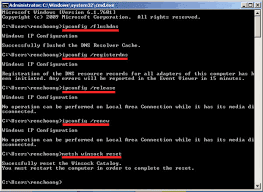
The issue may occur thanks to some fault within the Network. To resolve the difficulty, we want to execute some commands. These commands can flush DNS and reset your Network.


✔️First, open the Command Prompt as Associate in Nursing administrator, then run these commands, one by one.

✔️Finally, restart your pc, open the sport, and see if you're ready to connect with the server or not.


Solution:05-Disable IPv6


tarkov error on post,tarkov error,tarkov error fixed,how to fix tarkov error, Escape from Tarkov status code 523,Escape from Tarkov,error fixed tarkov error,tarkov,tarkov error,error,tarkov server down,


A lot of the victims were ready to resolve the difficulty simply by disabling the IPv6. And since most people don’t use this protocol anyway, disabling it won’t have any severe result. Follow the given steps to try to to an equivalent.
Thursday, 16 December 2021

[100% fixed] tarkov error 260 | escape from tarkov (solved)

[100% solved] How to fix tarkov error 260 (just a minute only) ? 

tarkov error 260,error 260,tarkov,escape from tarkov,how to fix tarkov error 260,tarkov error code 260,tarkov error 260 error code tarkov, what is tarkov error code 260

tarkov error 260,error 260,tarkov,escape from tarkov,how to fix tarkov error 260,tarkov error code 260,tarkov error 260 error code tarkov, what is tarkov error code 260

tarkov error 260,error 260,tarkov,escape from tarkov,how to fix tarkov error 260,tarkov error code 260,tarkov error 260 error code tarkov, what is tarkov error code 260

This is a game that has a place with the MMO (Massively Online Multiplayer) classification and has figured out how to assemble all in all a fair fan base lately. In this first-individual shooting computer game, you have been occupied with the fight scenes in an anecdotal town of Russia. The battle is over a Special Economic Zone a which has been shaken by a political outrage. You could either join the military or head over to the fixed regions and get your hands on however many plunders as would be prudent.


When attempting to sign on to Escape From Tarkov, you can get hit with various blunder messages. Two extremely normal blunders are Error 260, and Error 213. Both of these mistakes happen under similar conditions and appear to mean generally exactly the same thing.

However this independent game is really difficult and every one of its missions are really intriguing too, yet it isn't liberated from bugs. Quite possibly the most famous blunders that numerous user are confronting is Error 260. While they are going to dispatch the game or now and again even in the center of the game, they get a mistake message expressing: Servers briefly inaccessible. Accordingly, you were unable to get to the actual game, or on the other hand on the off chance that you are in the game, it may close. So for what reason does this occur in any case? Moreover, is there a fix to this Escape from Tarkov Error 260? We should look at.

Escape from Tarkov has seen a new lift in fame, in any case, very much like more players were acquainted with its in-your-face activity, they additionally knock into Error 260 and difficulty signing in.

tarkov error 260,error 260,tarkov,escape from tarkov,how to fix tarkov error 260,tarkov error code 260,tarkov error 260 error code tarkov, what is tarkov error code 260


Escape From Tarkov Error 260


Escape from Tarkov's Error 260 is an old colleague of its most punctual adopters, springing up when the game experiences difficulty associating with the validation servers.

Unfortunately, this implies that clients have a restricted arrangement of choices when Error 260 blocks them from playing Escape from Tarkov. Some have had karma getting in by spamming sign in endeavore, nonetheless, that is a long way from an optimal fix and hasn't settled the issue for everybody.

Players are basically left with the choice of holding up out Error 260 at whatever point it springs up, as designer Battle state Games chips away at re establishing their capacity to associate with the Escape from Tarkov servers.

For more assistance with Escape from Tarkov additionally look at our articles on error 213 and the profile information stacking mistake.


In that capacity, there's nothing you want to do to fix blunder 260. You'll have the option to reconnect to the game once the game's servers have settled. Nonetheless, assuming you presume that your game programming or home organizations is causing the issue, it merits keeping an eye on the current server status. Sites like Down Detector can assist you with precluding any nearby issues, and the Battle state Games Twitter account will stay up with the latest on any arranged server upkeep.


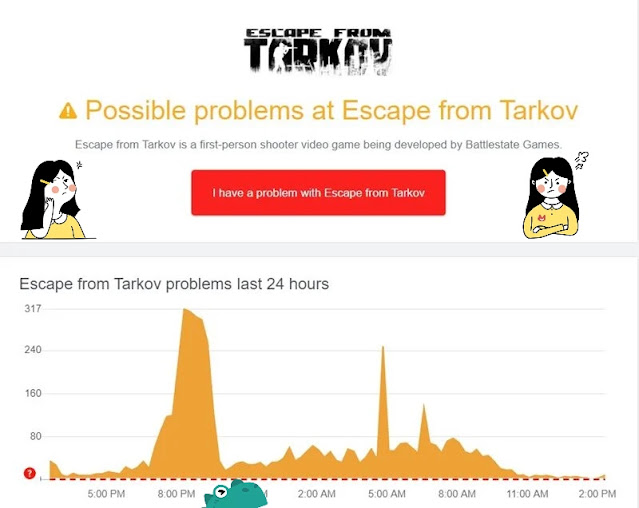
Really look at Issues With Game Servers(tarkov error code 260) 


The most ideal way to look at it is by means of the Down Detector website. Assuming there's an issue with the server, you should see something along the accompanying lines.

tarkov error 260,error 260,tarkov,escape from tarkov,how to fix tarkov error 260,tarkov error code 260,tarkov error 260 error code tarkov, what is tarkov error code 260

Be that as it may, assuming Down Detector makes reference to all that fine and dandy on the server end, then, at that point, you may give the fixes a shot your end. Like restarting the gadget, switch, and different fixes that we have referenced previously. You could likewise improve hint in such manner from the game's true Twitter handle, Battle state Games.


Conclusion


So this was all from this aide on what should be done when you face the Escape from Tarkov Error 260: Servers Temporarily Unavailable. Similarly, assuming you face Error 213, similar arrangement of directions should be followed. For the blunder to get amended, it may require something like two or three hours. Furthermore we as a whole ability troublesome it is to continue to hang tight for such a long time until your beloved game resumes.tarkov error 260,error 260,tarkov,escape from tarkov,how to fix tarkov error 260,tarkov error code 260,tarkov error 260 error code tarkov, what is tarkov error code 260