

How to fix omegle technical error (2022)?
What do you know about Omegle?
In the event that you're new to Omegle, this assistance used to be a famous site that allows you to combine with arbitrary outsiders on the web and visit.
It actually is well known, just the promotion isn't by and large equivalent to some time ago.
You could converse with others through sending instant messages (texting), yet you could likewise video-and voice-talk with them.
Hence, it's not actually difficult to see what made Omegle so engaging.
Omegle is apparently one of the best sites that permit you to video visit with outsiders. This is a cool help and can give you admittance to clients from various nations. In any case, numerous clients have grumbled that they can't the assistance. They see Error associating with server, Please attempt again message when attempting to interface with Omegle. That is the reason we are here. In this article, we will amend the Omegle server mistake and will perceive how you can resolve the issue with the assistance of a few straightforward arrangements.
For what reason is my Omegle not interfacing?
In the event that there is nothing bad about your PC organizations or your program, the blunder is server-side. On the off chance that the Omegle server is down you will not have the option to interface with its server. We will examine more on this and how to know whether the server is down hereinafter.
You may likewise see an Omegle server blunder assuming that there is some issue with your IP. Your IP may be hindered by Omegle or on the other hand assuming there is some error in your IP design. We are meticulously describing the situation and talk more with regards to it later.
One can likewise confront a few hard to miss issues like undermined reserve or helpless Internet association. Concerning the previous, clearing the reserve is the best approach, it won't influence your program presentation, all things considered, it will settle every one of the issues that it might or can have due to those stores. Be that as it may, for some other time, we really want to consider a few things.
[100% fixed] omegle technical error (2022) Solved
Solution:01- Is Omegle down?
As referenced before, the issue can happen assuming Omegle is down. To know whether the server status of any site, you can utilize any of the down locators. In the event that Omegle is down, the main thing you can do is sit tight for quite a while until Omegle engineers get it in the groove again. You can likewise have a go at really looking at the server status every once in a while to involve Omegle quickly.
Solution:02-Check your Internet Connection

Ensure you have a dependable organizations to interface with the Omegle server. Do an Internet speed test and see your transfer speed, on the off chance that it is slow, check assuming every one of the device associated with your organizations are having comparative transmission capacity. On the off chance that they are, restart your organizations device, be it your switch, modem, or your PC, and check whether the issue is settled. On the off chance that the issue perseveres, take a stab at reaching your Internet Service Provider and request that they settle the issue.click here to check internet speed of your mobile
Solution:03-Flush DNS and Reset Winsock

In the event that there is some error with your IP arrangement, the least demanding method for settling it is by executing a few orders. Along these lines, open Command Prompt as a chairman and run the accompanying orders to clear DNS, Reset Winsock, and so on
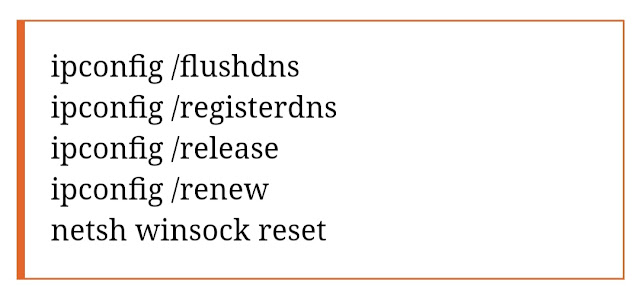
Subsequent to executing them, restart your framework and check whether the issue perseveres. On the off chance that it does, move to the following arrangement.
Solution:04-Clear Browser Cache
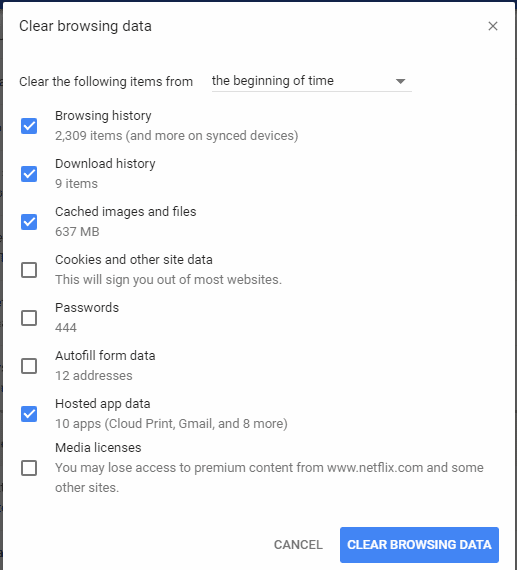
You probably won't have the option to interface with the Omegle server assuming that there is some issue with your program reserve. To determine it, you need to clear your program store. This will not adversely affect the working of your peruse, simply resolve the issue. So, clear the reserve of your browser and check whether the issue perseveres.
Solution:-05 Use VPN
At times, Omegle can hinder your IP and thus, you will not have the option to interface with the server. There are many motivations behind why they would do that, they can confuse you with a bot, or more terrible for a programmer. In both of the case, the server administrator can boycott your IP address. Some of the time, they can impede for a really long time, at times for a really long time, or until the end of time.
The best arrangement is to use a decent VPN administration. It is a basic way, that will make a passage for your organizations and you will actually want to associate with the Omegle server. In any case, not all VPN administrations work with Omegle, along these lines, you really want to ensure that you are not putting resources into administration without testing it a piece. Peruse the following segment to know more.