

Showing posts with label How do I fix. Show all posts

Thursday, 13 January 2022

[100% fixed] smite unable to connect to server (2022) solved.

How to fix smite unable to connect to server (2022) ? 

smite unable to connect to server,Why can't I connect to the SMITE servers?,How do I fix connection to server?,Why is SMITE so laggy 2022?, Smite unable to connect to server Xbox,Smite safe mode is on due to server,Smite servers are bad,Smite friends list not loading 2022,Smite servers down,Smite can t find match 2022

smite unable to connect to server,Why can't I connect to the SMITE servers?,How do I fix connection to server?,Why is SMITE so laggy 2022?, Smite unable to connect to server Xbox,Smite safe mode is on due to server,Smite servers are bad,Smite friends list not loading 2022,Smite servers down,Smite can t find match 2022

Destroy is an internet based milestone between legendary divine beings. Players look over a choice of divine beings, join meeting based field battle and utilize custom powers and group strategies against different players and cronies. Destroy is propelled by Defense of the Ancients (DotA) however rather than being over the activity, the third-individual camera brings you directly into the battle. What's more, rather than clicking a guide, you use WASD to move, avoid, and battle your direction through the itemized designs of SMITE's milestones.

Smite continues to appreciate accomplishment on Switch and PS4, however some of the time PC and Xbox One players experience issues. To be specific, network mistakes can bring about an issue where Smite can't associate with Xbox Live servers. However it doesn't occur regularly, this is really a typical mistake with an exceptionally straightforward arrangement.

All things being equal, you'll simply need to endure it. Administration interferences are irritating, yet in a web associated world, they are normal. These issues don't influence simply Smite, either; Xbox Live problems can hypothetically influence quite a few games on the stage.

Any other way, you might dislike your nearby organizations association. This ought to be genuinely self-evident, as you wouldn't have the option to peruse the web or play different games. Equipment shortcomings with your PC or Xbox control center can likewise cause such mistakes, however once more, you'd see the issue in other programming. Server blackouts are just considerably more typical.


How to fix smite unable to connect to server (2022) ? 


Solution:01.First of all Change the Game Installation Directory


It is conceivable that you inadvertently changed the genuine area of the game establishment. Assuming you introduced the game by means of Steam rather than an independent launcher, the game establishment envelope ought to be in one of the library organizers you picked. To fix Smite unfit to interface with Steam, you can change the game establishment registry.

Step 1. First of all you must be Right-click the Steam launcher and  you choose Run as administrator option

Step 2. You must be rundown of games and select the Play Game entry.

Step 3. In the Smite Launcher window, click on the Gear icon at the base passed on corner to open the Settings window.

Step 4. Click on the Troubleshoot button and sit tight for the Hi-Rez Game Support Diagnostic Tool to start.

Step 5.Here we take D:\Games\Hi-Rez Studios\HiRezGames\smite for model.
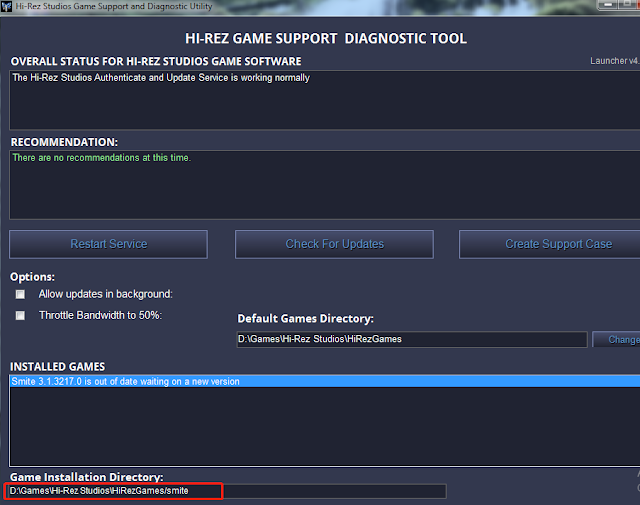

smite unable to connect to server,Why can't I connect to the SMITE servers?,How do I fix connection to server?,Why is SMITE so laggy 2022?, Smite unable to connect to server Xbox,Smite safe mode is on due to server,Smite servers are bad,Smite friends list not loading 2022,Smite servers down,Smite can t find match 2022

      Image credit-smitegames forum


Step 6. Apply this change and check whether the "Destroy can't track down Steam establishment" blunder vanishes.


Solution:02. Reinstall Hi-Rez Service from the Game Folder


As referenced over, the ruined Hi-Rez administration is liable for Smite can't track down Steam establishment. To fix the issue, you can take a stab at uninstalling the Hi-Rez administration and introduce it from the game envelope.

Step 1. Press Win + E keys to open the File Explorer, and afterward explore to your game establishment envelope. Generally, the default way is found in C:\Program Files (x86)\Steam\steamapps\common\Smite

Step 2. Inside the game establishment envelope, explore to Binaries > Redist folder.

Step 3.You can find out InstallHiRezService.exe file inside the Redist folder. In the event that this help has been introduced, uninstall it first. If not, double tap the executable file to introduce it.

Once introduced, relaunch the game and check if the "Steam Smite can't track down Hi-Rez establishment" blunder actually continues.


Solution 03. Utilize the Re-run Prerequisites Option


A few clients fixed the Smite incapable to associate with Steam issue by utilizing the Re-run Prerequisites option on Steam. Here you might have an attempt.

Step 1. Now, Repeat Steps one to four

Step 2. Click on the Re-run Prerequisites button at the lower part of the window. Then, at that point, you want to sit tight for quite a while to finish.

When gets done, you can relaunch the game and check whether the "Destroy Steam can't find the Hi-Rez establishment" mistake actually shows up.


Solution 04. Reinstall the Game


If all the above neglects to fix Smite can't observe Steam establishment, you might consider reinstalling the game. Here you can allude to this speedy aide.

Step 1. Press the Win + R keys to open the Run box. Then, at that point, type appwiz.cpl in it and hit Enter.

Step 2. Right-click Smite from the rundown of introduced projects, and afterward select Uninstall and follow the on-screen prompts to finish the Uninstallation. Once uninstalled, download the game from its authority site or Steam launcher and introduce it on your PC.

Tuesday, 28 December 2021

[100% fixed] nintendo eshop server communication error (solved)

How to fix nintendo eshop server communication error (solved) ? 

nintendo eshop server communication error,How do I fix unable to communicate with the server on Nintendo Switch?,How do I fix ACNH communication error?,how do i fix nintendo eshop server communication,Nintendo, Nintendo Switch error,how to,Nintendo eShop error,Nintendo eShop communication error

nintendo eshop server communication error,How do I fix unable to communicate with the server on Nintendo Switch?,How do I fix ACNH communication error?,how do i fix nintendo eshop server communication,Nintendo, Nintendo Switch error,how to,Nintendo eShop error,Nintendo eShop communication error


nintendo eshop server communication error How do I fix unable to communicate with the server on Nintendo Switch? How do I fix ACNH communication error? how do i fix nintendo eshop server communication Nintendo Nintendo Switch error how to Nintendo eShop error Nintendo eShop communication error

 In most cases, the error code is among the error message “Unable to speak with the server”. whereas some users are news that the difficulty is intermittent, others are language that for them, it’s occurring with each try of gap a game or the Nintendo Switch Store.

The information during this article will assist you once, whereas {you're|you are} trying to play  message and/or error codes are displayed:

nintendo eshop server communication error How do I fix unable to communicate with the server on Nintendo Switch? How do I fix ACNH communication error? how do i fix nintendo eshop server communication Nintendo Nintendo Switch error how to Nintendo eShop error Nintendo eShop communication error

"A Communication Error Occurred. Returning to the most Menu."


Note


🔵This error message and error codes might indicate a problem with the DNS used, or that the association regular out.

🔵These errors is also the results of a slow net association, wireless interference, or a weak wireless signal from the router.


How to fix Nintendo Switch Server Communication error?


Method 01: make sure that you’re on the most recent Switch computer code (firmware) update

nintendo eshop server communication error,How do I fix unable to communicate with the server on Nintendo Switch?,How do I fix ACNH communication error?,how do i fix nintendo eshop server communication,Nintendo, Nintendo Switch error,how to,Nintendo eShop error,Nintendo eShop communication error

If you’re encountering this error whereas attempting to access the Nintendo Switch store, it’s doable that the difficulty is going on as a result of you aren’t victimisation the most recent console computer code on the market. many affected users have reported  that the difficulty was resolved for them once they followed they updated the code version to the most recent.


Method 02:Now, Restart your Nintendo Switch.


nintendo eshop server communication error,How do I fix unable to communicate with the server on Nintendo Switch?,How do I fix ACNH communication error?,how do i fix nintendo eshop server communication,Nintendo, Nintendo Switch error,how to,Nintendo eShop error,Nintendo eShop communication error

If there’s no clear pattern once the “server communication” error shows up, it’s probably being caused by a random bug within the system. attempt to check if refreshing your console’s code can facilitate. simply press and hold the facility button for concerning three seconds, go to Power choices, and select Restart.


Method 03: Check for Nintendo server issues.


nintendo eshop server communication error,How do I fix unable to communicate with the server on Nintendo Switch?,How do I fix ACNH communication error?,how do i fix nintendo eshop server communication,Nintendo, Nintendo Switch error,how to,Nintendo eShop error,Nintendo eShop communication error


The next sensible issue that you simply will do once a full revive is to make sure that there’s no server problems. To do that, you wish to go to the official Nintendo server status site.


Method 04:Now, Run a speed test issues.


nintendo eshop server communication error,How do I fix unable to communicate with the server on Nintendo Switch?,How do I fix ACNH communication error?,how do i fix nintendo eshop server communication,Nintendo, Nintendo Switch error,how to,Nintendo eShop error,Nintendo eShop communication error


If the server communication error happens once you’re attempting to play an explicit game, or once AN attempt|attempting} to transfer and install an update on your Nintendo Switch, there’s an opportunity that its cause is slow net association. Your console is also having a tough time maintaining an honest association to the server and eventually disconnects.

To check your net association speed, you'll run the check association feature. Here’s how:


☑️Go to your Nintendo Home Screen.

☑️Select System Settings icon.

☑️Scroll down to Internet and choose it.

☑️Select Test association.

☑️Wait for the system to run a speed check.

☑️Take note of the transfer speed.


The suggested transfer and transfer speed that you simply ought to maintain on your Nintendo Switch, particularly if you play on-line games like Fortnite, is 5 Mbps. If your net association speed is slower than that, you can’t expect an honest association to the servers. 

If you're thinking that that your transfer speed is far too slow, attempt to see if you'll improve things by disconnecting alternative devices in your network which may be hogging the information measure. PCs and consoles that stream HD content will considerably block your network.

If you can’t appear to mend slow association issue in your network, get facilitate from your net Service supplier.


Method 05: You must be Use a unique DNS server.


nintendo eshop server communication error,How do I fix unable to communicate with the server on Nintendo Switch?,How do I fix ACNH communication error?,how do i fix nintendo eshop server communication,Nintendo, Nintendo Switch error,how to,Nintendo eShop error,Nintendo eShop communication error

By far, the foremost effective thanks to address the server communication error is to use a unique DNS server on the Nintendo Switch. Sometimes, the DNS server of your ISP might go down or encounter problems. to check if unhealthy DNS is that the main reason for the error you’re obtaining straight away, you'll manually enter associate degree alternate DNS on the console.